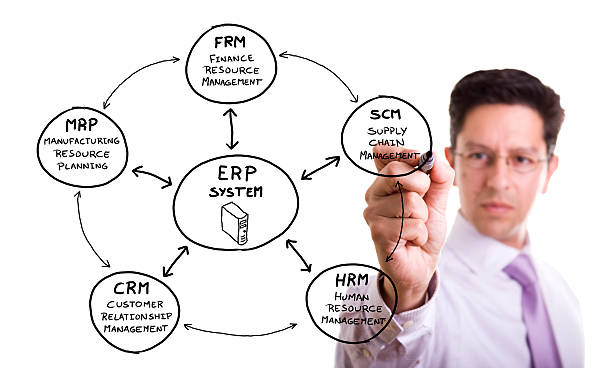
Business operations often involve many connected activities, from purchasing and inventory to finance, production, sales, and reporting. When these activities are managed through separate systems, information can become difficult to track and teams may spend unnecessary time moving data between applications.
erp solutions bring different business functions into a connected software environment. Instead of relying on separate tools for each department, an ERP platform can provide shared information and coordinated workflows.
For manufacturers, SMEs, enterprise businesses, and operations managers, the value of ERP software depends on how well it fits business processes. A successful system should support accurate information, clear accountability, controlled access, efficient workflows, and reliable reporting.
What Are ERP Solutions?
ERP stands for enterprise resource planning. An ERP system is software designed to manage and connect core business processes through a shared platform.
Depending on the system and business requirements, an ERP platform may include finance, purchasing, inventory, sales, human resources, manufacturing, supply chain, project management, and reporting.
How ERP Software Connects Business Functions
Traditional business systems can create information silos. One department may maintain customer information while another manages inventory and finance through separate applications.
ERP solutions can connect these functions so authorized users can work with information from a shared system.
For example, a transaction recorded in one part of the system may affect inventory records, financial records, purchasing information, or reporting. The exact connection depends on the ERP configuration and business processes.
ERP Is More Than a Software Purchase
Selecting an ERP platform is only one part of the project. Businesses also need to consider process design, data quality, user roles, integrations, training, security, testing, and ongoing support.
The software should be selected based on defined business requirements rather than a list of features alone.
Why Integrated Systems Matter for Business Operations
An integrated system can reduce the need for repeated data entry and provide departments with a more consistent source of information.
This can support better coordination between teams and make it easier for managers to monitor business activity.
Reducing Duplicate Data
Separate applications may require employees to enter similar information more than once. Repeated entry increases the chance of typing errors, outdated records, and inconsistent information.
An ERP system can reduce duplication by allowing authorized information to be shared between connected processes.
For example, customer, product, purchasing, inventory, and financial records can be connected according to the organization’s requirements.
Improving Access to Business Information
Managers often need information from several departments before making operational decisions. An integrated platform can make relevant data easier to access through reports, dashboards, and system records.
Access should still be controlled through user permissions. Not every employee needs access to every business record.
Core Functions Commonly Found in ERP Systems
ERP platforms vary considerably. A small business may need only a few core modules, while a large manufacturer may require production planning, supply chain management, financial controls, and detailed reporting.
The following table shows common ERP functions and their role within business operations.
| ERP Function | Main Purpose | Typical Business Use |
| Financial management | Manage financial records | Accounting, budgets, reporting |
| Inventory management | Track stock and movement | Warehouses, purchasing, order fulfilment |
| Procurement | Manage purchasing activity | Supplier records, purchase orders |
| Sales management | Track sales processes | Orders, customers, invoices |
| Manufacturing | Support production processes | Production planning, materials |
| Supply chain | Coordinate supply activities | Purchasing, logistics, stock planning |
| Human resources | Manage employee information | Payroll, employee records, administration |
| Reporting | Organize business information | Performance reports, management analysis |
The modules a company needs should depend on its size, industry, workflows, regulatory requirements, and future plans.
Financial Management Software Within ERP
Financial management is one of the most common ERP functions. It can bring accounting information into the same environment as operational data.
This may include accounts payable, accounts receivable, general ledger functions, budgeting, financial reporting, and transaction records.
Having financial and operational information connected can reduce the need to reconcile information manually between separate systems.
ERP and Business Process Automation
Business process automation can reduce manual steps in routine workflows. ERP systems may automate tasks such as approvals, notifications, purchase workflows, invoicing, inventory updates, and reporting.
Automation should not be added simply because a process can be automated. The underlying workflow should first be reviewed.
Start With the Process
Automating an inefficient process can make the same problem happen faster. Before automation is configured, businesses should document how the process currently works and identify unnecessary steps.
A useful process review asks:
- Who starts the process?
- What information is required?
- Who approves each stage?
- Where is the information stored?
- Which tasks are repeated?
- What causes delays?
- What errors occur?
- Which activities require human judgment?
The answers can guide ERP configuration and automation decisions.
Automation Needs Clear Controls
Automated processes still require monitoring. Businesses should define who can approve transactions, change records, modify workflows, and access sensitive information.
Audit logs and approval records can also help organizations understand what happened within a system.
Cloud ERP and Traditional Deployment Options
Cloud ERP systems are hosted through a cloud environment and are generally accessed through a network connection. Other ERP systems may be hosted on company-controlled infrastructure or use a hybrid model.
The right deployment method depends on business requirements, security expectations, technical resources, budget, compliance obligations, and existing infrastructure.
What Businesses Should Review Before Choosing Cloud ERP
A cloud ERP evaluation should include more than subscription pricing.
Organizations should review:
- Data storage and ownership
- Security controls
- User access management
- Backup procedures
- Service availability
- Integration options
- Data export capabilities
- Vendor support
- Contract terms
- Compliance requirements
A clear review helps decision makers understand how the system will operate within the company’s existing technology environment.
Inventory Management Becomes More Connected
Inventory information affects purchasing, production, sales, warehousing, and finance. Keeping these records connected can provide better visibility into stock levels and transactions.
ERP-based inventory management can include product records, stock movements, purchase orders, warehouse locations, reorder information, and other inventory-related data.
Better Inventory Records Depend on Better Data
ERP software cannot automatically fix inaccurate product records. Businesses should establish consistent product names, item codes, units, locations, supplier information, and other required fields.
Data quality should be reviewed before and after implementation.
This is especially relevant for manufacturers and businesses with multiple warehouses or large product ranges.
ERP Integration With Existing Systems
Many businesses already use specialist applications for payroll, ecommerce, customer management, logistics, production, or other functions.
ERP integration can allow these systems to exchange information rather than forcing employees to manage each system separately.
Plan the Flow of Information
Before connecting systems, teams should identify which application owns each type of data.
For example, one system may be the source for customer records while another manages payment information. The integration should define how information moves between the systems and what happens when an update fails.
Important integration questions include:
- Which systems need to connect?
- What data needs to move?
- How frequently should data be transferred?
- Which system is the source of truth?
- How are errors reported?
- Who monitors the integration?
- How are security permissions managed?
Clear answers reduce the risk of inconsistent records.
ERP Implementation Requires Careful Planning
ERP implementation can affect many parts of a business. A structured implementation process helps organizations prepare for technical and operational changes.
Implementation may include requirements gathering, system configuration, data migration, testing, employee training, deployment, and post-launch support.
A Practical ERP Implementation Process
| Stage | Main Activity | Key Consideration |
| Business review | Document current processes | Identify requirements and gaps |
| System selection | Compare suitable ERP platforms | Assess features, cost, security, and fit |
| Planning | Establish project scope | Assign responsibilities and timelines |
| Configuration | Set up the ERP | Align settings with approved processes |
| Data preparation | Clean existing information | Remove duplicates and incorrect records |
| Migration | Move data to the new platform | Validate transferred information |
| Integration | Connect other systems | Test data exchange and error handling |
| User testing | Test workflows | Confirm practical usability |
| Training | Prepare employees | Provide role-specific instruction |
| Deployment | Release the system | Monitor launch activities |
| Review | Assess system performance | Address issues and improve processes |
Each stage should have clear ownership and measurable outcomes.
Data Migration Deserves Special Attention
Data migration can be one of the more sensitive parts of ERP implementation. Existing information may have inconsistent formats, duplicate records, missing fields, or outdated entries.
A migration process should include data assessment, cleaning, mapping, transfer, validation, and appropriate backups.
Businesses should also establish a clear process for resolving migration errors before the new system becomes the main operating platform.
ERP Systems and Business Performance
The value of an ERP platform should be measured through business outcomes rather than the number of features purchased.
Useful performance measures may include processing time, data accuracy, inventory accuracy, reporting speed, order processing, user adoption, and administrative workload.
Measure the Areas That Matter
Each organization should establish metrics that relate directly to its objectives.
For example, a manufacturer may focus on production planning and inventory accuracy, while a professional services company may pay more attention to financial reporting and project management.
The system should provide information that helps managers assess these areas.
Reporting Can Support Better Decisions
An ERP platform can bring information from different departments into reports and dashboards.
However, reliable reporting depends on reliable source data. Businesses should establish clear data ownership and review processes so that reports are based on accurate information.
Security and Access Should Be Part of ERP Planning
ERP systems may contain financial information, supplier records, employee data, customer information, inventory details, and other sensitive business records.
Security should therefore be included from the planning stage.
Use Role-Based Access
Employees should receive system access based on their responsibilities. A finance employee may require access to financial records, while an operations employee may need inventory or production information.
Role-based permissions can limit unnecessary access and make it easier to review who can perform sensitive actions.
Businesses should also review access regularly, particularly when employees change roles or leave the organization.
Choosing an ERP Provider Requires Careful Review
An ERP project can affect business operations for years, so provider selection deserves careful consideration.
Decision makers should review technical capabilities, implementation experience, security practices, support arrangements, integration options, documentation, and communication standards.
Questions to Ask an ERP Provider
Before selecting a provider or implementation partner, businesses can ask:
- How will you assess our existing processes?
- How will ERP requirements be documented?
- What data migration support is available?
- How are integrations tested?
- What training is provided?
- How are security and permissions configured?
- How are implementation changes controlled?
- What support is available after deployment?
- How will project success be measured?
- How will the system be maintained over time?
Clear answers can help organizations compare providers based on their working methods and accountability.
ERP Solutions Should Support the Way a Business Works
ERP software should fit the organization’s actual operating needs. A system with many features may still be unsuitable if employees cannot use it effectively or if it requires unnecessary changes to important processes.
Good ERP planning starts with business requirements, followed by careful system selection, data preparation, integration, testing, training, and deployment.
For organizations assessing ERP requirements, integration needs, or implementation options, contact Resolve Data to discuss the next steps.
Frequently Asked Questions
ERP solutions are software systems that connect business functions such as finance, inventory, purchasing, sales, manufacturing, and reporting. They provide a shared platform for managing business information and processes.
ERP software can reduce duplicate data entry, connect business processes, improve access to information, support automation, and provide centralized reporting. The results depend on appropriate implementation, accurate data, user adoption, and suitable system configuration.
Cloud ERP can be suitable for SMEs, but suitability depends on business requirements, budget, security needs, integration requirements, and available technical resources. Organizations should assess these factors before selecting a deployment model.
ERP integration connects an ERP platform with other business applications so information can move between systems. Proper integration requires clear data ownership, defined data flows, security controls, testing, and error management.
You can learn more about Resolve Data and its approach by reviewing the company’s available information. Businesses can use this information when assessing ERP, software, integration, and implementation requirements.
Recent Posts
-
 ERP Solutions Explained: How Integrated Systems Improve Business Performance
-
 Successful Software Starts with the Right Implementation Strategy
-
 IT Security Trends Businesses Need to Address in 2027
-
 Successful Software Starts with the Right Implementation Strategy
-
 The Future Starts Now: How Digital Transformation Services Modernize Your Business

